
Empty squares are part of the picture
A Year in Pixels is a calendar drawn as a grid: twelve columns for the months, thirty-one rows for the days, one little square per day. You fill the square with a color. That’s the whole invention. It is not folklore and it does have an author: Camille drew the first year in pixels in December 2015, and the planner community took to it because a year of sentences is a novel, and a year of colors is a picture you can actually finish.
The advice that sounds simple is: color every day and you will understand yourself. The real work is gentler. You will not color every day. If the system treats a blank week as a moral failure, you will stop. The grid is only useful if it can survive a gap without becoming a monument to guilt.
The year is not a streak. It’s a picture. Empty squares are part of the picture.
What you wanted, and what January wanted
January wants 365 perfect squares and a legend with fourteen moods, including ones you will not remember in March. January is great at beginnings. January has never met a Tuesday in February.
What you actually wanted is a wall of color you can read from the kitchen. It does not care that you skipped Thursday. It cares that Thursday is empty, which is information.
Paper Year in Pixels assumes the beginning lasts until December. Most beginnings quit in February. That’s why a digital journal version exists: the grid is already drawn. You only have to show up for today.
How the grid is built
Classic paper layout: 12 columns (months), 31 rows (days), a gutter for 1–31, a header for J F M A M J J A S O N D, and a color key on the same spread. Short months leave leftover cells blank. Do not invent a shorter February column. The picture only works if every month is the same height.
There is a smaller cousin called Month in Pixels — same practice, one month. Use it if a full year feels like a dare. You can start on a random Wednesday. You do not need the first of January’s permission.
DayBloq uses that 12×31 idea on a phone: tap a color, fill today, add a note or a sticker if the day needs a caption. No ruler. No bleed-through. The mood tracker is just this grid with feelings assigned to the key — not a clinic.
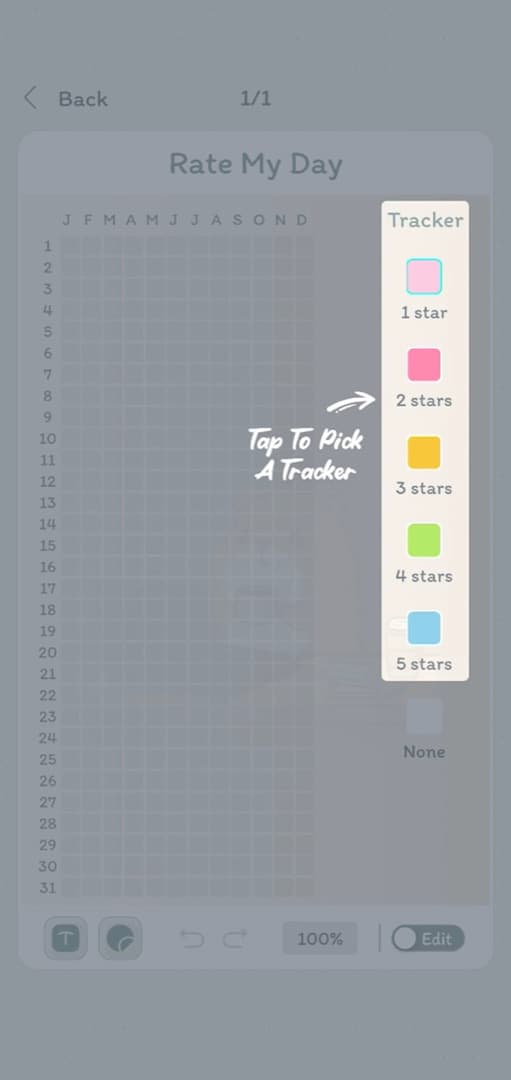
A key you can still read in December
Five to seven colors. More than that and the year turns into confetti. Write the meanings once. If yellow is “good” in January, it is still “good” in June, or you have two languages and no translation.
| Color | A meaning that survives a year |
|---|---|
| Yellow / gold | Great — a day you’d repeat |
| Green | Fine. Steady. Not a peak. |
| Blue | Quiet, tired, low volume |
| Purple | Low or foggy |
| Coral / red | Hard. Not “you failed.” |
| Gray | Neutral, or you didn’t log it |
You can key colors to habits instead of mood (did the thing / half / skipped). Don’t put mood and five habits on one square. That’s a private code you will forget. One journal, one question.
Two other keys that survive a full year, if mood is not the question you want to ask:
| Key | Colors | Good for |
|---|---|---|
| Habit | Did it · Half · Skipped · Not today | One habit, tracked honestly. Four colors, no argument with yourself at 11 p.m. |
| Energy | Full · Enough · Running low · Empty | People who find “how did you feel” too abstract but know exactly what empty means. |
If you want both mood and a habit, that is two journals, not two questions on one square. The second one costs you nothing and keeps both pictures readable.
Month in Pixels, if a year feels like a dare
Committing to a twelve-month grid in January is a big ask of a person who has not yet proved they will do this at all. Month in Pixels is the same practice at one-twelfth the promise: one month, the same key, the same one-square-a-day rule.
It solves two problems the year version has. You get a readable picture in four weeks instead of twelve months, which is early enough to fix a key that is not working. And starting does not require a date — you can begin on the 14th and the month is simply short at the front, which bothers nobody.
The trade is that patterns longer than a month stay invisible. Seasonal shape, the slow drift from February to May, the week every quarter that always goes coral — those only show up on a year. A reasonable pattern is a month first to test the key, then the year grid once you trust it.
Both live in the same app, so a month you already filled does not become a thing you abandoned when you move up to the year.
Four ways this goes wrong
None of these are moral failures. They are design problems, and they all have the same fix: make the thing smaller.
Fourteen colors
The key grows because a day felt specific. Then December arrives and you cannot tell “content” from “calm” from “fine,” and neither can the picture. Cap it at seven. If a day needs more precision than the key allows, that is what the note is for.
Filling in the past
You miss nine days, then sit down to reconstruct them. What you are recording at that point is your memory of a mood, which is a different measurement wearing the same color. Fill a gap only if you actually remember the day. Otherwise leave it. The gap is more honest than the guess.
Making it a streak
The moment the grid becomes a chain you are afraid to break, it stops being a record and becomes a chore with a scoreboard. A year with forty blank squares is still a year you can read. A year abandoned in February is not.
Redesigning instead of filling
A new palette, a nicer legend, a better layout. It feels like progress and takes an evening. Give the current key a month before you touch it. The grid will tell you what is wrong with it far better than a Sunday afternoon will.
How to look at it
- A blob of one color is usually a season, a job, or a weekly pattern you already suspected.
- A single odd pixel is a day worth opening the note for.
- A gray gap is a week you did not log. That’s data. Fill it only if you actually remember. If you’ve missed days, turn the page with kindness and begin again.
Apps that convert a miss into a broken streak are selling panic. DayBloq does not. The point is a year you can look at, not a chain you’re afraid to snap.
Paper or the phone
Keep paper if drawing the grid is the meditation. Use the phone if the book lives in a bag. Many people do both: ink for long writing, pixels for the days that would otherwise vanish. If it is paper you want, you do not have to rule it yourself — print a year in pixels sheet with the key already written. Here is the trade honestly, including where the app loses.
| Paper | Phone | |
|---|---|---|
| Setting up | A ruler and an evening, every January | Already drawn |
| Filling a day | Needs the notebook to be in the room | Needs the phone you are already holding |
| Changing your mind | It’s ink. That is either the charm or the problem. | Undo |
| The ritual | Real. Some people keep the practice only for this. | Thinner. A tap is a tap. |
| Losing it | Fire, coffee, a move | A lost phone, unless you backed it up yourself |
Journal data in DayBloq stays on the device, which is the honest version of “private”: no server has your year, and no server can hand it back if the phone goes in a river. This website is not your diary — privacy if you want the dull version.
Color today. Five colors. Stop adding colors. Android is on Google Play, and keeping the grid is free. What the subscription adds: the FAQ if you care.
What people ask about the grid
What is a Year in Pixels?
A Year in Pixels is a calendar drawn as a grid: twelve columns for the months, thirty-one rows for the days, one colored square per day. The year becomes a picture you can actually finish, instead of a novel of diary entries.
What if I skip days in a Year in Pixels?
Empty squares are part of the picture. Fill a gap only if you actually remember the day. The grid is useful if it can survive a blank week without becoming a monument to guilt.
How many colors should a Year in Pixels key have?
Five to seven colors. Write the meanings once and keep them. If yellow is “good” in January, it is still “good” in June, or you have two languages and no translation.
What should each color mean in a Year in Pixels?
Pick meanings you can still read in December. Mood keys work (great, fine, quiet, low, hard). So do habit keys (did it, half, skipped) and energy keys. What does not work is one square carrying mood and five habits at once — that is a private code you will forget by March.
Should I do Year in Pixels on paper or in an app?
Keep paper if drawing the grid is the part you enjoy. Use an app if the notebook lives in a bag and the day happens in your hand. Plenty of people do both: ink for long writing, pixels for the days that would otherwise vanish.
Can I do Year in Pixels on my phone?
Yes. DayBloq is a Year in Pixels app on Android: tap a color, fill today, add a note or a sticker if the day needs a caption. The grid is already drawn.

If you want the longer argument for putting the grid in your pocket, the digital journal essay is that page. For the phone you already carry, there is also a digital journal for Android.